WordPress Maintenance & Support Services: Costs, Scope & Checklist (2026 Guide)
WordPress runs nearly half the web — which means it is the favourite target of automated attacks, broken plugins and outdated code. The sites that get hacked or quietly disappear from Google are almost never the ones on a maintenance plan. Yet for most small businesses, maintenance feels like an optional extra. This guide makes the case for treating it as essential, explains what a professional WordPress maintenance and support service actually includes, what it costs in 2026, and how to tell a real care plan from a rubber stamp.
Why Every WordPress Site Needs Maintenance
- Security. Outdated cores and plugins are the entry point for malware, spam and SEO hijacking — attacks that can destroy months of reputation in a weekend.
- Reliability. Backup failures and unpatched breaking changes surface at the worst time: on a sales peak or a launch day.
- Performance. Sites quietly slow down as databases, caches and unused plugins pile up. Maintenance keeps load times healthy.
- Search trust. Google measurements like Core Web Vitals reward maintained, fast, secure sites.
What a Professional Plan Includes
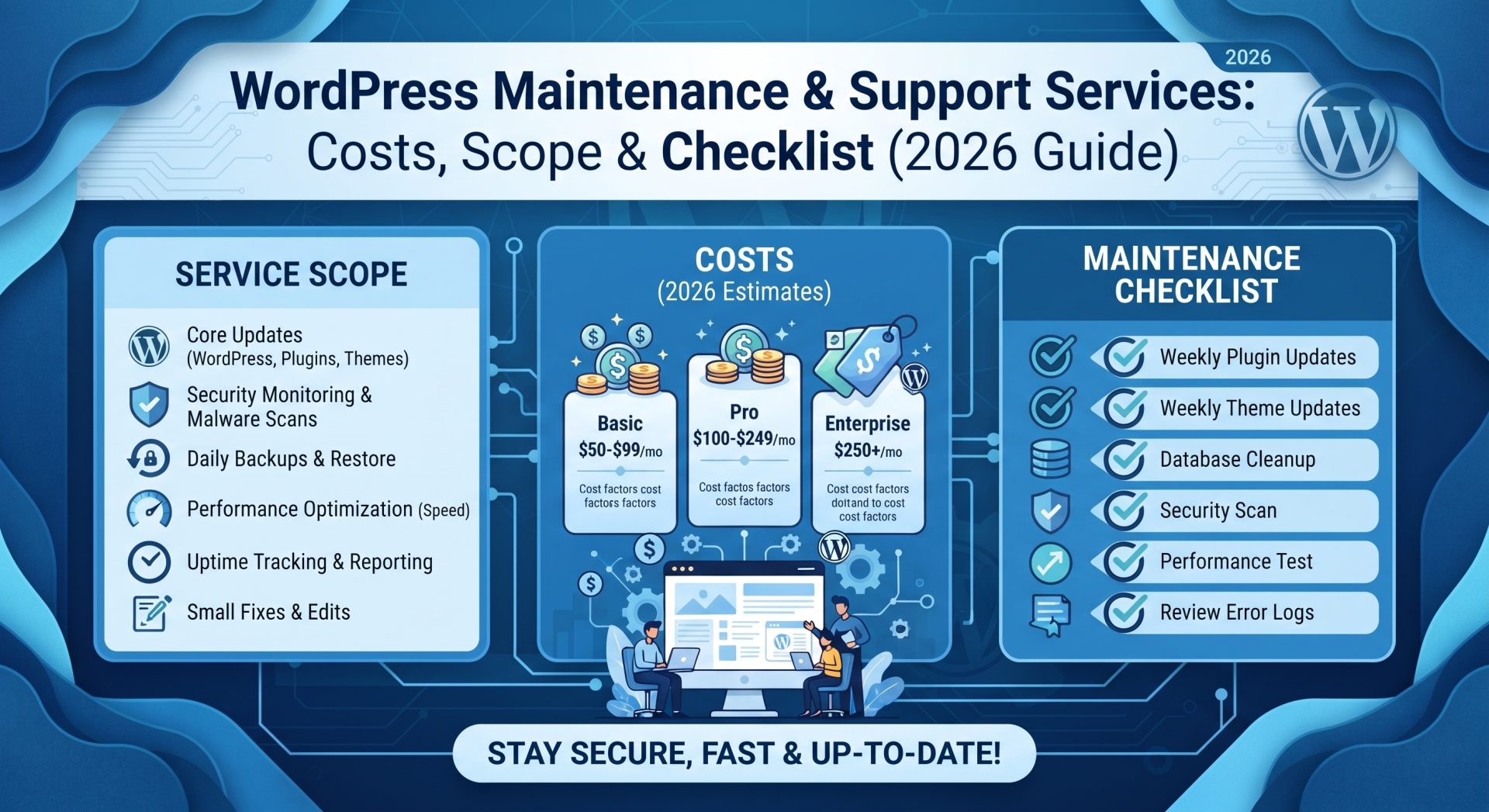
Core Updates
WordPress core, theme and plugin updates — tested before they go live, so an update never breaks your site. Staging-testing is the difference between a professional and a gambler.
Backups and Recovery
Automated off-site backups with a tested recovery path. The backup nobody has ever restored is just hopes and prayers.
Security Scanning
Malware scanning, file-integrity checks and login hardening. Some plans include a web application firewall; at minimum, monitoring should be baseline.
Uptime and Performance Monitoring
Downtime alerts plus regular checks on speed — with fixes included when something degrades.
Small Edits and Support
Most plans include a monthly allowance of small content edits and a support channel (hourly or ticket-based) for questions.
What WordPress Maintenance Costs (2026, USD)
| Plan | Typical cost/month | Who it suits |
|---|---|---|
| Essential (updates, backups, monitoring) | $50 – $150 | Brochure and content sites |
| Professional (adds security, edits, priority support) | $150 – $400 | Service businesses that live on their site |
| Advanced (adds dev time, SLA, optimisation) | $400 – $1,000+ | E-commerce, high-traffic and revenue-critical sites |
Compared with a single $2,000–$10,000 emergency rebuild or an ignored-patch outage during a launch, a professional care plan is dramatically cheaper. Our ongoing care and support plans are built around exactly this logic — predictable protection instead of reactive invoices.
DIY vs. Professional Maintenance
If you are technical and disciplined — a staging environment, tested updates on a schedule and recovery drills — DIY is viable on a quiet site. The moment your website holds real revenue, customer data or rankings, the maths changes: your hourly rate is better spent on the business than on update cycles. Most owners who "DIY" admit they last did updates six months ago.
Red Flags in a Maintenance Provider
- Updates applied straight to production without testing.
- No staging environment at all.
- Backups that have never been restore-tested.
- No defined response time for emergencies.
- Preaching annual contracts with no monthly option or exit.
Security Is the Real Price of Admission
Maintenance plans are judged on uptime, but the part that protects your business is security. Most hacked WordPress sites are not hacked because a hacker wanted them specifically; they are automated victims of out-of-date plugins, weak logins and unprotected admin areas. A professional plan hardens the obvious entry points: it keeps every core file, plugin and theme updated, restricts unnecessary login attempts, disables unused plugins, and monitors files for unauthorized changes. It also reduces admin risk — a reputable provider will refuse common shortcuts like shared credentials or running the site on a shared, unmanaged server.
Backups deserve equal weight. A real backup is off-site, automatic, tested, and restorable to a working state, not just a copy sitting on the same server that just failed. On launch day this distinction is an abstraction; six months later, when a plugin update breaks a page or a hosting incident wipes a directory, the tested backup is the difference between a two-hour recovery and a two-week rebuild. Ask your provider where backups live, how often they are taken, how long they are kept, and when they were last successfully restored. If the answer is vague, that is your signal to look elsewhere. The cheapest maintenance plan in the world is expensive the moment it fails you in a real emergency.
Putting the checklist on paper changes the relationship from trust-based to measurable. At regular intervals review what was actually done: updates applied, uptime recorded, backups restored in a drill, core files tested after every update, and the response time from first report to resolution. If your provider cannot show logs or evidence of these activities, you are not buying maintenance; you are buying a claim. Small businesses that hold monthly reviews of their provider's report usually extend their site's useful life by years. Clear expectations in writing are the cheapest form of insurance a WordPress business can own.
The Checklist to Hold Your Provider Accountable
- Ask for their last three update logs — real entries, with test notes.
- Ask them to demonstrate a restore from backup, on camera.
- Ask what happens in a hack: emergency service level, cost, and SLA.
- Confirm who owns the account/site if you leave.
- Get reports monthly: updates, uptime, backups, security scans.
Frequently Asked Questions
Can I maintain WordPress myself for free?
For a simple site, yes — if you actually keep the schedule. The majority of owners do not, which is why professional plans pay for themselves.
Does maintenance improve my SEO?
Indirectly, meaningfully. Site speed, security trust and uptime all feed search performance. A maintained site compounds its SEO; an abandoned one unravels it.
What happens if my site is hacked?
A good provider will clean it, restore from backup, harden it against the same attack — and tell you how it got in. Ask precisely what a plan covers before you need it.
Final Thoughts: Treat Maintenance as Insurance That Pays
Professional WordPress care is the cheapest insurance your online business can buy — it protects your rankings, your reputation and your uptime. Whatever route you choose, make sure backups are real, updates are tested and compliance is recorded. Ask us about a care plan audit — we will review your setup and give you an honest list of what is protected and what is not.