Affordable Website Design for Small Business in 2026: What You Get (and What You Can Skip)
"Affordable" is the most loaded word in web design. To some it means $99 a month on a rented builder; to others it means a $5,000 custom site that earns the money back in the first quarter. The businesses that win are the ones that understand what affordable really buys — and what they can safely skip. This guide is a straight-talking 2026 playbook for small-business owners in the US who want a professional website without burning their operating budget.
What Affordable Actually Costs in 2026 (USD)
| Route | Typical cost | Trade-off |
|---|---|---|
| DIY website builder (Wix/Squarespace) | $15 – $50/month | Fast, but generic and time-hungry on a good day |
| Template-based agency build | $500 – $2,500 one-off | Affordable, decent base; weaker differentiation |
| Custom small-business site | $2,500 – $7,500 | Best ROI for most businesses that sell anything |
| Custom + e-commerce or booking | $5,000 – $15,000 | Serious capability at a serious price |
For the majority of US small businesses, a well-built custom site in the $3,000–$6,000 range — designed around leads, speed and trust — is the affordable sweet spot. That is exactly the kind of outcome a disciplined web design process delivers: fixed scope, clear milestones, no endless change orders.
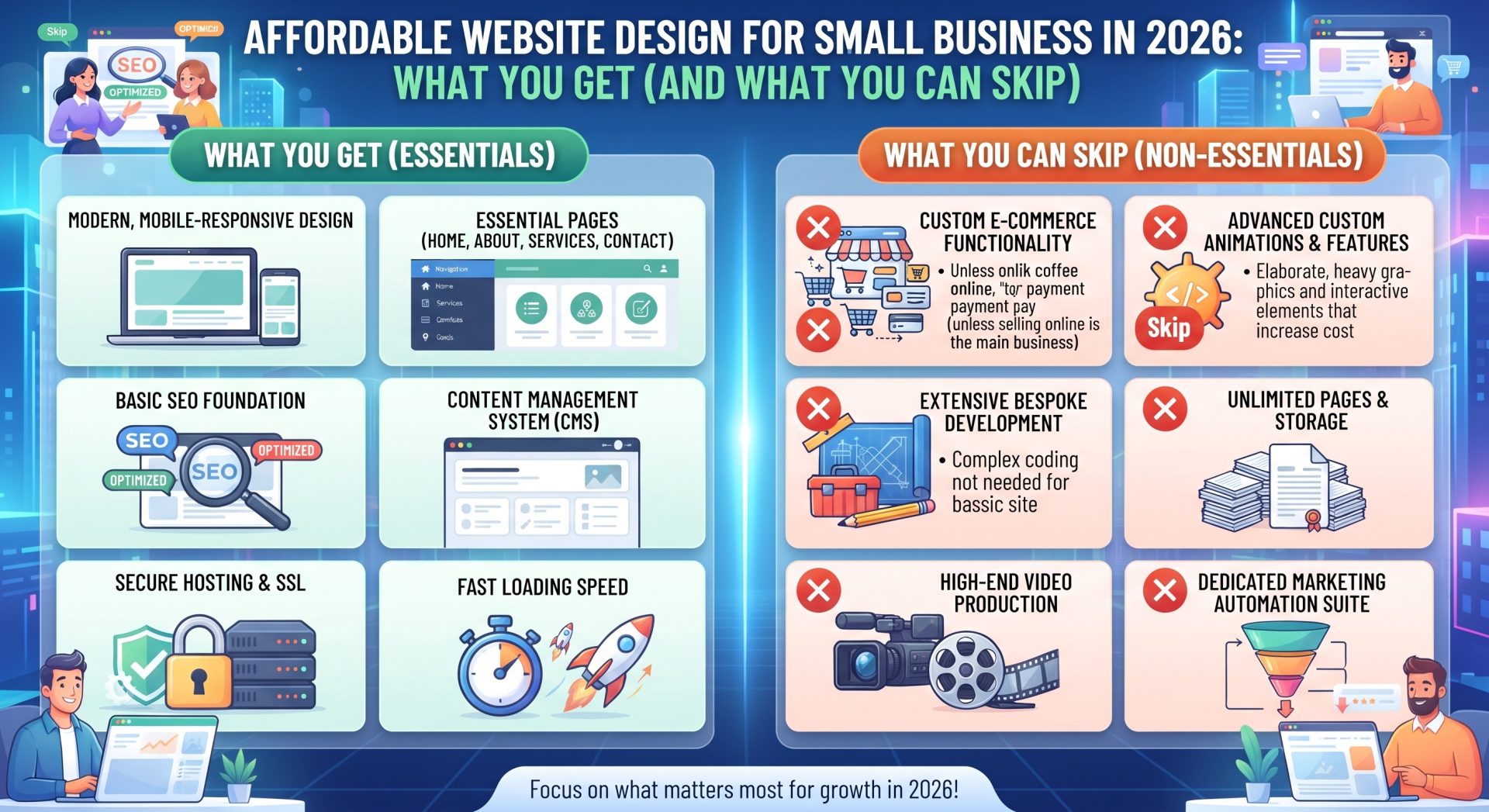
What You Get When You Buy "Affordable" Properly
Pages That Answer the 3 Questions Customers Ask
Your site exists to answer three questions: what do you do, why should I trust you, and how do I buy. Every dollar you spend on clarity for those questions outperforms decorative flourish.
Mobile Performance That Doesn't Embarrass You
Most US traffic is mobile. A fast, thumb-friendly site is no longer premium — it is table stakes for credibility and for Google rankings.
A CMS You Can Actually Use
You should be able to edit your own content, add images and publish a blog without a developer on speed dial. Ownership beats wizardry.
Basic SEO Foundations
Clean URLs, sensible page titles, schema and a sitemap. It is cheap at build time and painful to retrofit. A solid foundation pairs well with a later technical SEO and performance pass.
What to Safely Skip
- Unlimited animations and parallax effects — they add cost and often harm speed.
- A bloated page count. Five strong pages beat twenty half-empty ones.
- Custom features you will not use in year one. Start lean; add as demand proves itself.
- Stock-photo-heavy design. A few authentic photos of your team and work beat generic imagery.
Staying on Budget Without Regretting It
The secret to affordable web design is not negotiating the price down; it is keeping the scope from creeping up. Start with a written list of what the site absolutely must do, and treat everything else as phase two. Choose a design built on a proven layout rather than a fully bespoke art direction — visitors rarely judge you on uniqueness, but they instantly judge loading speed and navigation. Provide your own photos, or use a starter pack of licensed stock images, to avoid paying per-image fees. Gather all content before development begins, because content written while the build is running is the single most common source of delays and extra invoices.
Designate one decision-maker on your side. Agencies routinely wait on approvals from committees, and every waiting week either inflates the final invoice or quietly shrinks the scope. Request milestone-based payments tied to deliverables — design approval, then development, then launch — so both sides know exactly what is owed and when. Finally, ask what is included after launch: a week of fixes? A month? Content training? The answer belongs in writing before you sign, not after. Affordable does not mean rushed; it means a tight, honest scope delivered on time. A small business that follows this pattern usually ends up with a faster, better-lead-generating site than a company that paid three times more with no process at all.
One detail changes the whole economy of the project: who writes the content. Agencies commonly charge separately for copywriting, and per-page copy billed by a third party can double a small budget. If you can write service descriptions, answers to common questions and a basic about page yourself, do — then let the agency polish tone and structure. Decide early whether you need a blog or case-study section too, because ongoing content is an ongoing cost. The affordable website is rarely the one with the lowest headline figure; it is the one whose scope, content and maintenance are understood before the first invoice, leaving no room for surprise line items.
Where the Hidden Costs Hide
Hosting and Email
Budget $10–30/month for proper hosting plus domain and business email. "Free" hosting with your plan often means slow performance and locked-in renewal surprises.
Maintenance
Even lean sites need updates and backups. A monthly care and maintenance plan at $50–150/month protects your investment and keeps you online.
Content
Who writes the words? If the agency writes them, budget for it. Drafting your own copy before the project starts saves money and improves the result.
Questions to Ask Before You Sign
- What exactly is included, and what is an add-on?
- Who writes the content and who supplies the photos?
- Do I own the site fully, including the design and code?
- What happens after launch — support window? Monthly care?
- Can you show two sites for businesses like mine, with results?
Frequently Asked Questions
Can I really get a good website for under $2,000?
You can get a solid template-based site. The moment you need design, SEO foundations and trust-building features, realistic budgets start around $3,000.
Is a DIY builder cheaper long-term?
Often not. Between subscription creep, your time and the cost of looking generic, most owners end up at an agency within a couple of years anyway.
Should I pay a deposit?
A 25–50% start deposit is normal. Be wary of anyone demanding the full amount upfront or refusing to show a contract.
Final Thoughts: Affordable Is a Plan, Not a Price
An affordable website is one that generates more value than it costs — quickly. Define what your site must do, spend on the features that cause revenue, skip the rest, and protect it with maintenance and SEO from day one. If you want help building that plan, tell us your business model and budget — we will tell you honestly what you can expect for it.